What Is Dolby Atmos for Headphones and How Does It Work?
Achieving a full theatre-grade soundstage usually means setting up a complex array of speakers beforehand. Something that’s expensive, space-consuming, and not very portable. Dolby Atmos for headphones has changed this by bringing that 3D immersion to a personal headset. Here, we break down exactly how Dolby Atmos for headphones works, explore the benefits over traditional sound, and help you decide if you need it.
What Is Dolby Atmos?
Standard audio formats function by assigning sound to fixed left and right channels. Dolby Atmos moves away from this restriction by defining audio as independent objects located within a 3D coordinate grid. Software metadata determines the exact position of a sound, like a bird chirping above or a car passing behind, rather than just choosing a speaker. This object-based framework results in a dynamic environment that operates outside the fixed constraints of traditional stereo, positioning the listener at the precise centre of the field.
Why Dolby Atmos Is Harder to Achieve on Headphones
A dedicated room allows for the physical placement of speakers to handle the format. Headphones operate in a far more confined space, creating a specific set of engineering hurdles when trying to simulate distance
Limited Physical Space for Sound to Bounce
Inside a theater, sound travels through the air and bounces off the walls before it hits the ears. This process gives a sense of the space. Since headphones sit directly against the ears, they remove that natural air gap and the physical reflections that usually define a wide soundstage.
Difficulty in Reproducing Height and Depth
Creating a sense of elevation and depth is difficult when the drivers stay horizontally aligned with the ear canals. Human hearing relies on how sound waves hit the folds of the outer ear to determine if a noise comes from above or at a distance. Without actual overhead speakers, creating a convincing sense of height requires massive digital processing.
Lack of Multi-Speaker Setup
A full Atmos home theater often uses seven or more speakers plus a subwoofer, yet headphones only have two drivers. This physical limit remains the biggest obstacle. To get around this, headphones must use virtualization to make two speakers mimic a complex twelve-channel array.
How Does Dolby Atmos on Headphones Work?
The system operates through virtualization, a process that modifies the audio signal to replicate how human ears perceive sound in a physical environment.
1. Virtualizing 3D Sound Experience
Virtualization interprets the object-based metadata from an Atmos track and maps it onto a stereo output. This technology is a game-changer, especially for those using wireless headphones for TV, as it allows a pair of headphones to recreate the massive soundstage of a cinema right in your living room. It ensures that, despite having only two speakers, the soundstage feels expansive rather than confined to the space between the ears.
2. Using Binaural Audio to Create Directional Sound
Binaural audio is the core technology behind Atmos for headphones. It replicates human hearing through a Head-Related Transfer Function (HRTF). This method ensures a sound originating from the left reaches the right ear with a slight time delay and a modified frequency response, mimicking real-world acoustics.
3. Utilizing Head-Tracking Technology
Premium hardware, such as the Shokz OpenFit Pro, is specifically optimized for Dolby Atmos via head-tracking sensors. These internal sensors calculate the exact orientation of the head relative to the playback source. If a user turns their head away from a screen, the audio shifts dynamically to maintain its fixed position in the virtual room, adding a layer of physical logic to the experience.
4. Software Enhancements for Height and Depth
Digital layers like Dolby Access apply specific frequency filters that emphasize height cues. By adjusting certain tones, the software mimics the way sound waves interact with the environment when coming from above. This allows the listener to perceive vertical movement, such as a helicopter hovering overhead, through a standard pair of drivers.
5. Adjusting Sound with Customizable Profiles
Most Atmos-capable systems include dedicated modes for cinema, music, or gaming. These profiles allow for adjustments based on the specific requirements of the media. This level of calibration ensures the spatial effect remains precise, whether the user is focused on dialogue in a podcast or directional cues in a competitive shooter.
Open Ear Headphones with Dolby Atmos for 2026
Specific hardware is required to process spatial audio data in real time. Currently, open ear headphones equipped with Dolby Atmos not only provide a high-quality spatial audio experience but also ensure comfort during extended wear, making them one of the more ideal choices for spatial audio headphones in 2026.
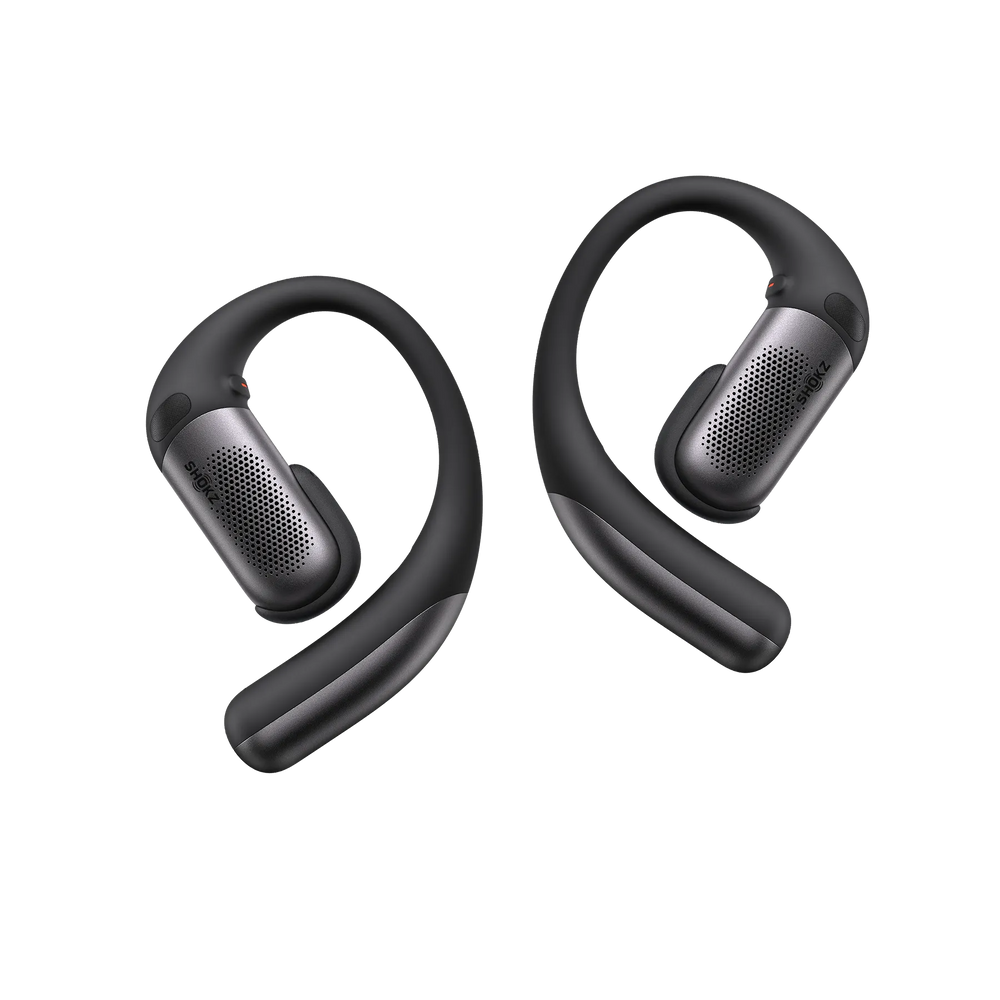
OpenFit Pro
The OpenFit Pro utilizes internal head-tracking sensors to maintain spatial alignment. During film playback, the audio remains fixed to the screen position, preventing the soundstage from rotating with the user’s head. Its open-ear architecture allows for natural air movement, which assists in making the 3D effect feel less claustrophobic compared to sealed designs.
Tips to Maximize Your Dolby Atmos Experience
Achieving peak performance from a spatial setup requires more than just compatible hardware. Calibration and source verification are the actual drivers of a high-quality output.
Ensure Your Source Supports Atmos
One key to getting the best Dolby Atmos experience is making sure your audio or video source actually contains native Atmos metadata. In streaming platforms like Netflix (Premium) or Apple Music, those will support Dolby Atmos only when it shows the specific badge. Without this, headphones default to upscaling stereo signals, which lack the precise directional data of a true 3D mix.
Turn On the Settings on Your Device
Atmos functionality is rarely active by default. Windows users must install the Dolby Access interface to toggle the spatial sound settings manually. For mobile platforms, Dolby Atmos support varies by manufacturer and model. You may find the setting in your device’s sound or audio settings, or require a direct check within the app to confirm that the spatial processing is engaged.
Give Your Ears a Break from Intense Sound
The brain requires more cognitive resources to process 3D spatial cues compared to traditional flat audio. This often leads to listening fatigue during long sessions in a home theater or gaming environment. Periodic breaks are necessary to maintain the clarity of the directional effects and prevent the soundstage from becoming muddy due to sensory overload.
FAQ
1. Is Dolby Atmos for headphones worth it for music?
Yes. Moving away from flat stereo is the main goal here. This tech maps audio into a 3D sphere rather than just two channels. When using high-quality headphones for music, it lets a bass line hit from behind while vocals stay at the center, giving live recordings a proper theater feel that standard headphones usually lack.
2. Is Spotify the only music service with Atmos?
No, Spotify still lacks a Dolby Atmos catalog. Genuine spatial audio requires Apple Music, Amazon, or Tidal. You need to look for the Atmos badge on specific albums. These tracks are remixed from the ground up to use object-based data, which is a massive jump over regular files.
3. Does Dolby Atmos only work with wired headphones?
Both wired and wireless headphones handle it perfectly. The spatial processing happens in the software before the sound ever reaches the drivers. Because of this, you get the same 3D depth whether you use a Bluetooth set or a physical cable.
4. Why can't I enable Dolby Atmos?
Usually, this is a software gap or a settings error. On Windows, the Dolby Access app must be installed to activate the license. Mobile users should check their app settings specifically, as the "Download in Dolby Atmos" toggle is often turned off by default.
5. Why is Dolby Access not recognizing headphones?
This is typically a mapping error in the sound control panel. Ensure the headphones are set as the Default Device first. You also need to shut down any other "spatial sound" or "enhancement" software, as those programs tend to clash with the Dolby driver and block the connection.
Conclusion
Moving to Dolby Atmos for headphones serves as a cost-effective alternative to a multi-speaker physical theater array. This format provides the necessary vertical and horizontal data required for modern gaming and high-resolution audio. It helps you dive into a new game or rediscover your favorite album. The added depth and height make every detail feel more lifelike. Just remember to check your source content and device settings to ensure you are getting the full experience.
Author Information

guides on Shokz
Related Posts